Built for Windows 10 and 11 · 64-bit

Record ABA combo strings
replay them on hotkey.

Capture your anime battle arena sequences—button presses, timing, everything—then hit a hotkey to repeat them frame-perfect. Train your combos consistently or grind overnight while the macro handles the loop.

No telemetry or analyticsFree forever, no paid upgradeNo game injection or modificationsv1.0.0
Hotkey replayAFK grindingCombo practiceSpeed controlOffline only
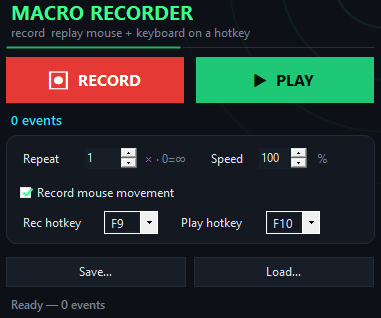
ABA Macro app window on Windows
Why use this

Why ABA players choose this over manual farming.

A macro built for your workflow, not a complicated bot or a web tool that times out.

Instant recording

Press F9, execute your combo, press F9 again. Your inputs are captured exactly as you played them. No setup, no learning curve.

Works in fullscreen

Input replays at the hardware level, so it works even when ABA is running fullscreen. No window focus nonsense.

Save and reuse

Every combo string saves to a file. Load the same routine tomorrow, next week, or on another machine without re-recording.

Nothing intrusive

The macro replays ordinary keyboard and mouse input—no game modifications, no injection, no hooks. You control what runs and when.

See it work
Inside the appABA Macro window

Combo strings loop exactly as you recorded them.

Your button presses, timing, and sequences play back identically every run. No variation, no drift—the macro hits the same inputs in the same order.

Practice loopRecord a full combo sequence and replay it 50 times in a row to drill execution.
AFK grind sessionSet a farming loop to repeat indefinitely while you step away; stop it anytime by pressing the hotkey again.
Speed tuningSlow the replay to 10% to debug timing issues, or push to 1000% to blow through long sequences in seconds.
Get started

Set up your first combo macro in four steps.

From download to your first replay takes less than a minute.

What it does

What you are downloading.

Version1.0.0
PlatformWindows 10 and 11, 64-bit
InstallQuick download, no account
LicenseMIT, source on GitHub
PriceFree, no account
LanguageEnglish
Questions answered

Questions about ABA Macro.

Does the macro work while ABA is fullscreen?

Yes. Input is replayed at the hardware level, which works in fullscreen games where simpler tools fail.

Can I replay a combo at different speeds?

Yes. Use the speed slider to replay at 10% to debug timing, normal speed for drills, or up to 1000% to race through long farming loops.

Can I save multiple combos?

Yes. Each combo saves as its own file. Load whichever routine you need and press F10 to run it.

Will this get me banned?

The macro replays ordinary keyboard and mouse input, the same as any other input method. It does not modify the game or inject code. You control what runs and when; check ABA's rules to decide if macros are allowed in your play.

Does it need an account or internet?

No. The app runs fully offline. There is no login, no telemetry, no update ping—just you and your combos.

Can I use the same macro on another machine?

Yes. Save your combo file, copy it to another computer, open ABA Macro, load the file, and press F10. No reconfiguration needed.

What if my timing is off in replay?

Slow the speed slider down to 10%, watch the replay and spot where the timing drifts, re-record that section more carefully, then play at normal or faster speed.
How it compares

How ABA Macro stacks up against other tools.

Most macro tools feel clunky or intrusive; this one is built for the job.

 ABA MacroTypical game macro tool
Setup timeOne minuteFiddling for hours
Fullscreen gamesWorks reliablyOften fails
File storageSave unlimited combosCloud or no save
PrivacyOffline, no telemetryTracks usage
CostFree foreverSubscription or locked
Game safetyPlain input onlyOften injected

Record your combo strings once, grind forever.

Start now—download ABA Macro and turn your practice sequences into repeatable routines.

Download for Windows
Latest release · v1.0.0

ABA Macro guides